
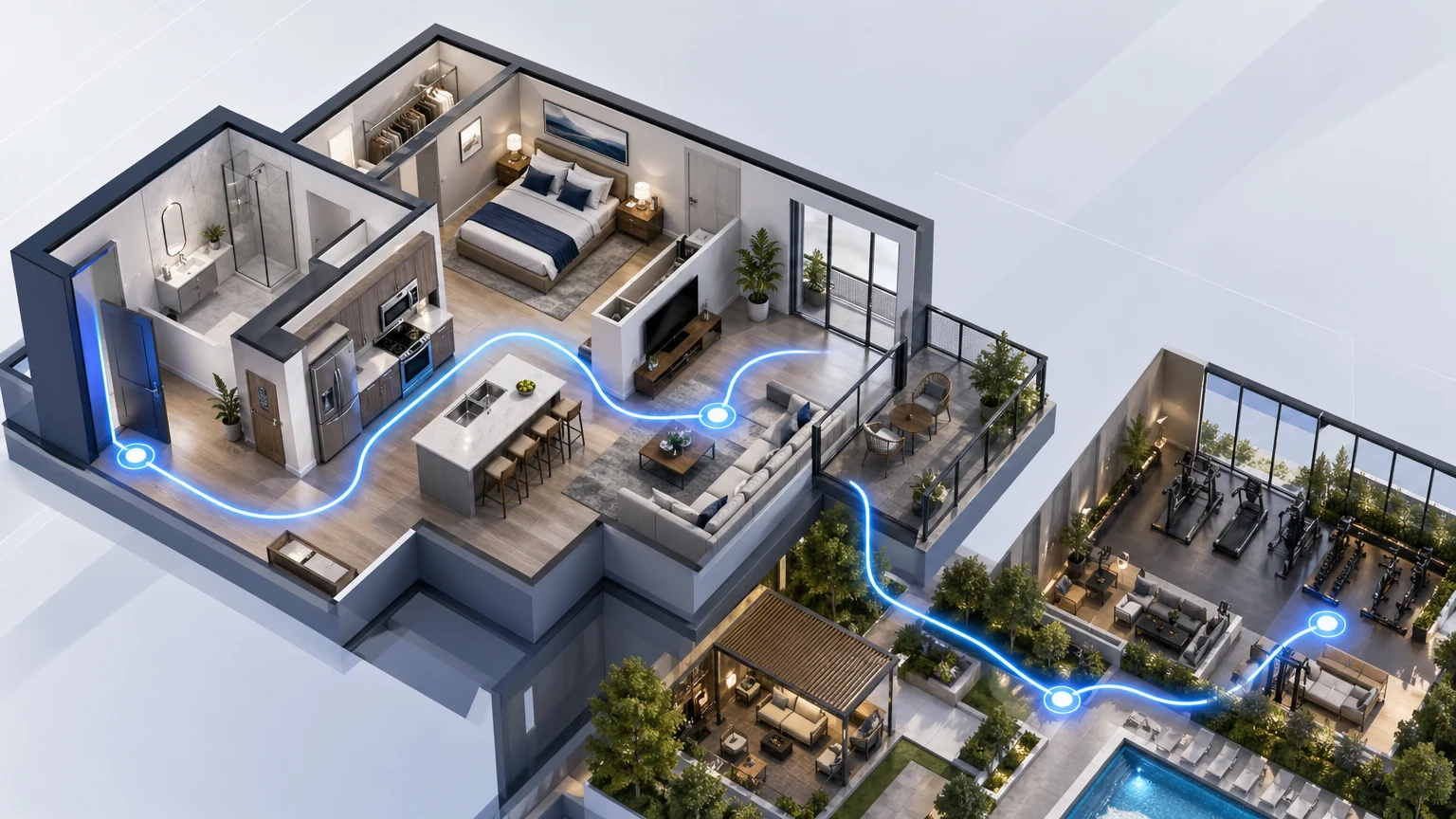
Pre‑leasing moves fast, and your prospects need clarity before the first hard hat comes off. They want to understand how a floor plan flows, how close a unit is to the elevator and the gym, and what their everyday route will feel like. A pre‑leasing virtual tour should answer those questions in sequence, not leave visitors to guess.
That’s why xdreality takes a guided approach. Instead of a free-roam viewer, you design guided, interactive paths that walk renters from curb to lobby to unit, highlighting context and next steps at each stop.
The pre‑leasing communication gap
Photos, renderings, and isolated 360s don’t tell the whole story during lease‑up. Prospects need a sense of place:
- How a plan lives: corridor to entry to kitchen, not just a single hero angle.
- Amenity proximity: lobby, mail, gym, coworking, and roof in relation to a specific stack.
- Vertical context: where the unit sits relative to elevators, parking, and noise sources.
- Leasing logistics: what happens after they’re interested—join a waitlist, book time with a rep, or see availability.
When you’re still building out the on-site experience, the message must be intentional. A guided pre-leasing virtual tour sequences the story of the building the same way a leasing associate would: clear, guided, and outcome-oriented.
Guided tours vs. free-roam viewers
Most 3D tools drop visitors into a space and hope they figure it out. That’s risky in pre‑leasing. Free‑roam can feel overwhelming, and it often hides the details that matter for decision‑making.
A guided tour in xdreality is different:
- Guided steps: Visitors advance through a curated flow—street → lobby → elevator → level → unit—so they never miss the essentials.
- Branching choices: From a shared start, prospects can choose a floor plan, a view orientation, or a furnished vs. unfurnished apartment room tour.
- Context markers: Labels, pins, and captions clarify what’s around the unit and how to get there.
- Clear actions: Inline CTAs connect each moment to a next step—schedule, join a waitlist, or request a quote.
The result: visitors don’t just “spin” around a model; they complete a leasing walkthrough that mirrors an in‑person appointment.
Design a pre‑leasing virtual tour flow that answers real questions
Start with the questions your leasing team hears on every call and map them into a narrative. A simple, effective pattern looks like this:
- Arrival and identity
- Exterior or streetscape: What’s the presence? Where do guests arrive?
- Brand slice: Name, neighborhood, and three reasons to care.
- Entry and orientation
- Lobby and mail: First‑touch spaces every resident uses.
- Elevator and circulation: How the building moves.
- Shared spaces that matter
- Gym and wellness: Show proximity, not just equipment.
- Coworking and lounge: Day‑to‑day living, Wi‑Fi, and focus areas.
- Roof or courtyard: Social anchor and view context.
- Typical level and corridor
- Wayfinding cues: Where a stack sits on a floor.
- Sound and light considerations: Place the unit relative to common areas.
- The unit story
- Leasing hero: A primary plan (e.g., A1) with a guided walkthrough—entry → kitchen → living → bedroom → bath → storage.
- Option paths: Branch to alternate plans, different view directions, and small vs. large layouts.
- Furnished toggle or style variants: Show how the same plan supports different living modes.
- Decisions and next steps
- Availability and incentives: Link to the current offer strategy.
- Scheduling: Book a call or tour time.
- Follow‑up: Capture email to receive the exact tour route via link.
Keep each step short and meaningful. The goal is not to show everything; it’s to move a prospect confidently to the next action.
Build a multifamily virtual tour with xdreality
xdreality gives multifamily and rental marketing teams a guided 3D platform to publish tours quickly and keep them aligned with pre-leasing goals.
- Route authoring: Define a start point and add sequential stops—exterior, lobby, amenities, corridor, and unit. Add branches for floor plans and views.
- Scene markup: Add text cards, pins, and image callouts that explain what matters at each step. Clarify proximity and context with simple labels.
- Unit‑level storytelling: Create an apartment room tour that highlights living zones and storage without forcing visitors to hunt for hotspots.
- Guided CTAs: Insert booking links, waitlist forms, or contact prompts at natural moments—after a shared space, before a plan selection, and at the end of a unit tour.
- Brand consistency: Apply colors, iconography, and naming patterns so every touchpoint feels on‑brand from ad to tour to follow‑up.
- Fast publishing: Update routes as construction milestones open up new spaces. Swap renders for photography without rebuilding the flow.
Because the experience is guided, your team controls the story and keeps attention on details that drive conversions.
Integrate with your marketing and leasing workflows
A pre‑leasing virtual tour should live wherever prospects discover you and wherever leasing teams work.
- Website: Embed the guided multifamily virtual tour on the floor plan page or a dedicated pre-leasing page with clear CTAs.
- Paid media: Use deep links that start visitors on specific routes (e.g., “Tour B2 South View”) from ads or social.
- Email and SMS: Send short links that reopen the tour at the exact step a prospect left off.
- On‑site: Use touchscreen or tablet mode for in‑office leasing walkthroughs—your associate drives, the route does the rest.
- CRM and scheduling: Connect CTAs to your preferred booking or form tools so every tour moment can capture interest.
For pre‑leasing teams, this creates a repeatable, high‑signal conversation. Every prospect gets the same core story, and associates can branch when needed.
Measure, iterate, and scale across your portfolio
A guided structure makes performance visible and actionable.
- Completion tracking: See where visitors stop—after lobby, after amenities, or within a unit—and adjust content accordingly.
- Step‑by‑step insights: Identify which plans, views, or shared spaces keep attention longest.
- Content tests: Swap the order of steps or adjust messaging to improve completion and click‑through.
- Portfolio reuse: Clone a proven flow from one lease‑up to the next, then localize routes and labels.
The pattern stays consistent, the message stays clear, and your team saves time on every new property.
Practical tips for a stronger pre‑leasing virtual tour
- Start from the outside in: Context builds trust before details. Always begin with the arrival experience.
- Keep steps short: Each stop should answer one question and advance to the next.
- Label proximity: Use simple markers—“Lobby one level below,” “Gym off the second floor,” “Rooftop above this stack.”
- Show the everyday route: Corridor to door, door to kitchen, kitchen to living—the feel of movement matters.
- Provide a decision path: From the unit, present clear branches—“See the south view,” “Compare B2,” “Check availability.”
- Make CTAs obvious: Place booking and waitlist actions where motivation is highest, not just at the end.
When you keep attention on the sequence, prospects retain the story and act on it.
Why xdreality for pre‑leasing
xdreality is built for guided experiences that communicate space and context, not just visuals. For pre-leasing teams, that means:
- A guided approach that mirrors an associate‑led walkthrough.
- Flexible branching that supports multiple plans and views without confusion.
- Clear, in‑tour calls to action for faster handoffs to leasing.
- Easy updates as a property moves from renders to photography.
You don’t need a game engine or a specialized studio to ship a clear tour. Your marketing team can design, publish, and evolve the experience in days—not weeks—so the message keeps pace with construction and demand.
If you want to connect this approach to a live route strategy, review Apartment Virtual Tour Software for Leasing Teams and Room Tour Software for Real Estate Teams. If your question is format choice rather than lease-up flow, compare Virtual Tour vs Video for Property Marketing.
Closing: map your pre‑leasing route with us
If you’re preparing a lease-up, now is the time to design the narrative that will carry every prospect from ad click to signed lease. xdreality helps you publish a guided pre-leasing virtual tour that explains layouts, amenity proximity, and unit context, then drives the next step.
Book a demo to map a pre‑leasing virtual tour flow for your community. We’ll help you outline the route, prioritize the moments that matter, and launch a multifamily virtual tour that converts.